
Widgets
Widgets allow users to interact with scene objects and drive functionality through clicking, dragging, and touch.
VTK.js currently has two flavors of widgets: the first, located in Sources/Interaction/Widgets, is the VTK C++ style widgets that were semi-ported over. The second, located in Sources/Widgets, is the new-style VTK.js widgets that were architected from the ground-up to address shortcomings with the original widget architecture.
The rest of this document will be only concerned with the new-style widgets, as the old-style widgets are deprecated (but won't be removed in the near-term).
Widget Architecture Overview
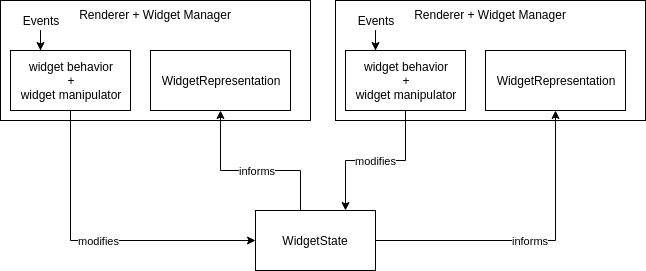
The widget architecture follows the Model-View-Controller (MVC) pattern. In mapping the MVC pattern to VTK.js widgets, there are three primary components involved:
vtkWidgetStateis the model and the central source of truth for a widget. When a widget is available across different renderers, they all refer to the same widget state object for updates.vtkWidgetRepresentationis the base class for the view, which listens to a widget state object and generates the appropriate VTK.js scene objects that represent the state.vtkAbstractWidgetis the base class that contains widget behavior, interaction code, and a reference to the widget state. This object is closest to the controller.
In addition to the three components above, there are widget manipulators, a widget manager, and an abstract widget factory. In brief, manipulators take events (e.g. mouse events) and translate them into some meaningful 3D coordinate. For widgets, this is usually located within the widget behavior code. The widget manager is a per-renderer manager that manages the lifecycle of widgets attached to one specific renderer. The abstract widget factory is the primary object that creates the widget state, constructs subclasses of vtkAbstractWidget to be attached to a widget manager, and constructs the associated representations with the view/renderer.
The following diagram demonstrates the relationships between the different components of the widgets. The example shows off the case of a widget being shown in two different renderers, with a single shared widget state.
Widget Factory
The widget factory is used to construct widgets, widget state, and representations. From the widget factory's perspective, it starts by building a single vtkWidgetState. When a widget is requested via getWidgetForView(), the factory creates a new widget object, attaches the widget state to the widget, creates the appropriate representations, and sets those representations on the widget.
Widget developers should subclass vtkAbstractWidgetFactory in order to create widgets. vtkAbstractWidget is meant as an internal class by the widget factory, and thus should not be subclassed.
Widget State
The widget state is the central store and source of truth for widget data. By separating widget data out from vtkAbstractWidget, many widgets across many renderers can be kept in sync by referring to a single widget state. States can also be nested with sub-states, leading to a tree of states. Changes to any node within the state tree should propagate up and reflect as a change event in the root state.
While constructing a widget state by hand is possible, it is much easier (and recommended) to use vtkStateBuilder for the majority of use cases. vtkStateBuilder simplifies the construction of widget states through the use of a handful of APIs: addField(), addStateFromMixin(), etc. More information can be found in the vtkStateBuilder docs.
Mixins are self-contained state bundles that further assist state creation for common state properties. They can be applied to a sub-state via the addStateFromMixin() builder API. Examples of commonly used properties include position, visibility (mixin named "visible"), color, and size (mixin named "scale1").
Widget Representation
Representations are scene objects that render based on the attached widget state. These are not to be instantiated directly; rather, these should be referenced in an implementation of vtkAbstractWidgetFactory.getRepresentationsForViewType.
There are two types of representation behaviors: handle and context. The primary difference is handles are pickable and contexts are not pickable. If you want to create a non-pickable representation, extend vtkContextRepresentation which sets the representation behavior as a context. Otherwise, extend vtkHandleRepresentation to get pickable handles.
Widget representations are implemented as VTK.js algorithms. That is, they must implement requestData(inData, outData), where inData contains the widget state and outData should be set with the resultant vtkPolyData. Here, requestData is intended to generate a relevant representation given a widget state, e.g. placing spheres at points provided as a list in the widget state.
When using a representation, care must be taken to ensure that the state has certain properties available. As an example, vtkSphereHandleRepresentation expects "origin" and "position" mixins to be specified, but optionally can take the "visible" and "scale1" mixins. Each representation specifies their dependency in their documentation and their requestData method.
Widget representations must generate actors to be added to a scene. Internally, all actors should be appended to the model.actors array in order to be rendered.
Scaling representations to have fixed pixel size
In order to scale a representation such that it retains the same size in display space, a widget representation should use the scaleInPixels property and the getPixelWorldHeightAtCoord(coord) method. When scaleInPixels is set to true, a widget representation should multiply whatever scaling they perform by the output of getPixelWorldHeightAtCoord(coord).
Look at the SphereHandleRepresentation as an example for how getPixelWorldHeightAtCoord is used.
If scaleInPixels is false, then all scale values should be interpreted as world scales.
Widget Manager
The widget manager manages the lifecycle of a widget associated with a view/renderer. In order to add a widget into a renderer, a widget manager must first exist for that renderer (via the widget manager's setRenderer(ren) call). The widget manager's addWidget() method takes in a vtkAbstractWidgetFactory and uses the factory to construct a widget and associated representations for the particular view.
Widget manipulators
Manipulators are objects that implement a single method, handleEvent(callData, glRenderWindow). This method takes a mouse event (in callData) and transforms it into a 3D coordinate position, returning an object containing at least a worldCoords and eventually other values. This is different from interactivity manipulators in that interactivity manipulators change how the scene is viewed via manipulating the camera, whereas widget manipulators transform mouse input into meaningful world coordinates, e.g. snapping positions to a line.
An example manipulator would be a plane manipulator. When instantiated with a plane point and normal, the plane manipulator will project mouse events onto the plane in 3D and return that projected point.
SVG Representation Support
vtk.js no longer supports SVG-based widget representations, as managing the SVG rendering mechanisms are better left to a separate library. All of the examples that used SVG representations have been rewritten to use a rendering shim based on snabbdom, located in Examples/Utilities/SVGHelpers.js.
If you are looking for a reasonably easy drop-in for rendering SVG representations, check out the above SVGHelpers.js, which requires snabbdom to be installed. An example usage can be found in the vtkPolyLineWidget example.