Marching squares: count, scan, write
A contour algorithm produces a variable amount of output: some cells emit no
segments, others one or two. This example extracts a circle from samples of
x² + y² - 0.7² and gives each cell a known, disjoint interval in the output.
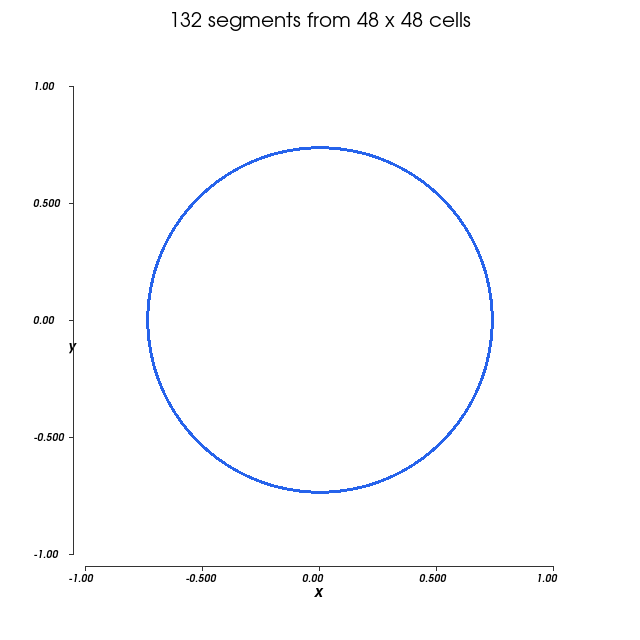
Origin: a teaching adaptation of Taichi's marching-squares example, Copyright © The Taichi Authors, Apache-2.0. This version replaces animated noise with an analytic circle, uses paired edge crossings instead of a lookup table, and uses an exclusive scan instead of appending to a dynamic list.
Count crossings per cell
The input has (n + 1, n + 1) scalar samples and therefore n * n cells. Each
cell reads four corners in order around its perimeter. An edge crosses the level
when its two endpoints differ in sign:
@tack.kernel
def count_segments(scalar, counts, n):
    for c in range(n * n):
        i, j = c // n, c % n
        s = corners(scalar, i, j)
        crossings = 0
        for edge in range(4):
            if (s[edge] > 0.0) != (s[(edge + 1) % 4] > 0.0):
                crossings += 1
        counts[c] = crossings // 2
Two crossings form one segment; four form two. This example pairs crossings in perimeter order. For general data, four-crossing saddle cells need a deliberate connectivity decision, such as an asymptotic decider. A coarse arbitrary field can also contain features that its corner samples miss. Those are algorithmic issues rather than storage problems; the circle avoids saddle ambiguity.
Turn counts into output intervals
For example:
| Cell | Count | Exclusive offset | Output slots |
|---|---|---|---|
| 0 | 0 | 0 | none |
| 1 | 1 | 0 | 0 |
| 2 | 2 | 1 | 1, 2 |
| 3 | 1 | 3 | 3 |
The scan returns the total, four, so the host can allocate exactly four segments:
    counts = tack.empty((n * n,), tack.i32)
    offsets = tack.empty((n * n,), tack.i32)
    count_segments(scalar, counts, n)
    total = exclusive_scan(counts, offsets, n * n)
    if total == 0:
        return np.empty((0, 2, 2), dtype=np.float32), n
    lines = tack.empty((total, 2), tack.vec2(tack.f32))
    write_segments(scalar, offsets, lines, n)
The return value reaches Python to choose an allocation size; the counts and
offsets remain arrays. The example returns early when total == 0: there is
nothing to write. The scan is several launches, and reading its total waits
for the device, so this pattern is not free for small inputs.
Write without competing for slots
The second cell visit recomputes crossings, interpolates their positions along edges, and writes within that cell's interval:
@tack.kernel
def write_segments(scalar, offsets, lines, n):
    for c in range(n * n):
        i, j = c // n, c % n
        s = corners(scalar, i, j)
        x = tack.vec4(float(i), float(i + 1), float(i + 1), float(i))
        y = tack.vec4(float(j), float(j), float(j + 1), float(j + 1))
        px = tack.local_array(tack.f32, 4)
        py = tack.local_array(tack.f32, 4)
        hits = 0
        for edge in range(4):
            other = (edge + 1) % 4
            if (s[edge] > 0.0) != (s[other] > 0.0):
                t = -s[edge] / (s[other] - s[edge])
                px[hits] = x[edge] + t * (x[other] - x[edge])
                py[hits] = y[edge] + t * (y[other] - y[edge])
                hits += 1
        for k in range(hits // 2):
            slot = offsets[c] + k
            lines[slot, 0] = [px[2 * k] * 2.0 / n - 1.0, py[2 * k] * 2.0 / n - 1.0]
            lines[slot, 1] = [px[2 * k + 1] * 2.0 / n - 1.0, py[2 * k + 1] * 2.0 / n - 1.0]
The two private arrays hold at most four crossings per iteration. Their sizes
are fixed, and every used element is written before it is read. Output is a
two-component vector array of shape (total, 2): two endpoint vectors per
segment. No atomic is needed for those writes.
Unlike a fetch-and-add append, scanning fixes output order by input cell order. The tradeoff is visiting each cell twice and performing a scan. Use the same pattern for filtered particles, mesh faces, variable neighbour lists, or any operation with a count known per input item.
Run and check
uv run python docs/examples/contours.py --check
uv run --with vtk python docs/examples/contours.py --output contours.png
The check verifies scan offsets against NumPy cumulative sums, valid nonzero segments, and the analytic circle residual within the interpolation error of the grid. Try coarsening the grid, then refining it and observing how the polygon approaches the circle.
Complete program
Download contours.py. The adapted code is Apache-2.0 licensed.
# Copyright (c) 2026 Kitware, Inc.
# SPDX-License-Identifier: Apache-2.0
"""Marching squares using count, scan, and write.

Teaching adaptation of Taichi's marching_squares.py, Copyright (c) The Taichi Authors.
Apache-2.0; see LICENSE-APACHE-2.0.txt.
Source: https://github.com/taichi-dev/taichi/blob/master/python/taichi/examples/algorithm/marching_squares.py
Uses an analytic circle and paired edge crossings instead of the original noise and table.
"""

import argparse

import numpy as np

import tack
from tack.algorithms import exclusive_scan


@tack.func
def corners(scalar, i, j):
    return [scalar[i, j], scalar[i + 1, j], scalar[i + 1, j + 1], scalar[i, j + 1]]


@tack.kernel
def count_segments(scalar, counts, n):
    for c in range(n * n):
        i, j = c // n, c % n
        s = corners(scalar, i, j)
        crossings = 0
        for edge in range(4):
            if (s[edge] > 0.0) != (s[(edge + 1) % 4] > 0.0):
                crossings += 1
        counts[c] = crossings // 2


@tack.kernel
def write_segments(scalar, offsets, lines, n):
    for c in range(n * n):
        i, j = c // n, c % n
        s = corners(scalar, i, j)
        x = tack.vec4(float(i), float(i + 1), float(i + 1), float(i))
        y = tack.vec4(float(j), float(j), float(j + 1), float(j + 1))
        px = tack.local_array(tack.f32, 4)
        py = tack.local_array(tack.f32, 4)
        hits = 0
        for edge in range(4):
            other = (edge + 1) % 4
            if (s[edge] > 0.0) != (s[other] > 0.0):
                t = -s[edge] / (s[other] - s[edge])
                px[hits] = x[edge] + t * (x[other] - x[edge])
                py[hits] = y[edge] + t * (y[other] - y[edge])
                hits += 1
        for k in range(hits // 2):
            slot = offsets[c] + k
            lines[slot, 0] = [px[2 * k] * 2.0 / n - 1.0, py[2 * k] * 2.0 / n - 1.0]
            lines[slot, 1] = [px[2 * k + 1] * 2.0 / n - 1.0, py[2 * k + 1] * 2.0 / n - 1.0]


def run(arch="cpu", check=False):
    tack.set_default_device(arch)
    n = 24 if check else 48
    axis = np.linspace(-1, 1, n + 1, dtype=np.float32)
    scalar = tack.array(axis[:, None] ** 2 + axis[None, :] ** 2 - np.float32(0.7**2))
    counts = tack.empty((n * n,), tack.i32)
    offsets = tack.empty((n * n,), tack.i32)
    count_segments(scalar, counts, n)
    total = exclusive_scan(counts, offsets, n * n)
    if total == 0:
        return np.empty((0, 2, 2), dtype=np.float32), n
    lines = tack.empty((total, 2), tack.vec2(tack.f32))
    write_segments(scalar, offsets, lines, n)
    points = lines.numpy()
    if check:
        assert points.shape == (total, 2, 2) and total > 0
        assert np.isfinite(points).all()
        # Independent geometry check: linear edge interpolation approximates this circle.
        residual = np.abs(np.sum(points**2, axis=-1) - 0.7**2)
        assert residual.max() < (2.0 / n) ** 2
        assert np.all(np.linalg.norm(points[:, 0] - points[:, 1], axis=1) > 0)
        host_counts = counts.numpy()
        host_offsets = offsets.numpy()
        np.testing.assert_array_equal(host_offsets, np.cumsum(host_counts) - host_counts)
        assert int(host_counts.sum()) == total
    return points, n


def save_figure(result, output):
    import vtkmodules.vtkRenderingFreeType
    import vtkmodules.vtkRenderingOpenGL2  # noqa: F401
    from vtkmodules.vtkCommonCore import VTK_TEXT_CENTERED, VTK_TEXT_TOP, vtkIdTypeArray, vtkPoints
    from vtkmodules.vtkCommonDataModel import vtkCellArray, vtkPolyData
    from vtkmodules.vtkIOImage import vtkPNGWriter
    from vtkmodules.vtkRenderingAnnotation import vtkCubeAxesActor2D
    from vtkmodules.vtkRenderingCore import (
        VTK_NORMALIZED_VIEWPORT,
        vtkActor,
        vtkPolyDataMapper,
        vtkRenderer,
        vtkRenderWindow,
        vtkTextActor,
        vtkWindowToImageFilter,
    )

    segments, n = result
    xy = segments.reshape(-1, 2)
    lines = vtkPolyData(
        points=vtkPoints(data=np.column_stack((xy, np.zeros(len(xy))))),
        lines=vtkCellArray(
            offsets=vtkIdTypeArray(np.arange(len(segments) + 1, dtype=np.int64) * 2),
            connectivity=vtkIdTypeArray(np.arange(len(xy), dtype=np.int64))))
    mapper = vtkPolyDataMapper()
    lines >> mapper
    actor = vtkActor(mapper=mapper)
    actor.property.color = (0.15, 0.39, 0.92)
    actor.property.line_width = 3
    renderer = vtkRenderer(background=(1, 1, 1))
    renderer.AddActor(actor)
    camera = renderer.active_camera
    camera.position = (0, 0, 1)
    camera.focal_point = (0, 0, 0)
    camera.parallel_projection = True
    camera.parallel_scale = 1.3
    axes = vtkCubeAxesActor2D(bounds=(-1, 1, -1, 1, 0, 0), camera=camera, x_label="x",
                              y_label="y", number_of_labels=5, z_axis_visibility=False)
    axes.axis_title_text_property.color = (0, 0, 0)
    axes.axis_label_text_property.color = (0, 0, 0)
    axes.property.color = (0.2, 0.2, 0.2)
    renderer.AddViewProp(axes)
    title = vtkTextActor(input=f"{len(segments)} segments from {n} x {n} cells", position=(0.5, 0.98))
    title.position_coordinate.coordinate_system = VTK_NORMALIZED_VIEWPORT
    text = title.text_property
    text.justification = VTK_TEXT_CENTERED
    text.vertical_justification = VTK_TEXT_TOP
    text.font_size = 20
    text.color = (0, 0, 0)
    renderer.AddViewProp(title)
    window = vtkRenderWindow(off_screen_rendering=True, multi_samples=0, size=(640, 640))
    window.AddRenderer(renderer)
    window.Render()
    capture = vtkWindowToImageFilter(input=window, read_front_buffer=False)
    writer = vtkPNGWriter(file_name=str(output))
    capture >> writer
    writer.Write()  # calling the writer, or updating it, writes raw pixels instead of a PNG
    window.Finalize()


if __name__ == "__main__":
    parser = argparse.ArgumentParser(description=__doc__)
    parser.add_argument("--arch", default="cpu", choices=["cpu", "metal", "cuda", "hip", "level_zero"])
    parser.add_argument("--check", action="store_true")
    parser.add_argument("--output", help="Save a figure (requires VTK)")
    args = parser.parse_args()
    result = run(args.arch, args.check)
    if args.output:
        save_figure(result, args.output)
    print("Contours: check passed" if args.check else f"Contours: {len(result[0])} segments")