Advecting coloured dye
A blob of RGB dye rotates in a prescribed velocity field. Every output cell traces backward to find where its colour came from, then interpolates the old dye there. This introduces vector arrays and reusable device functions without requiring a fluid pressure solver.
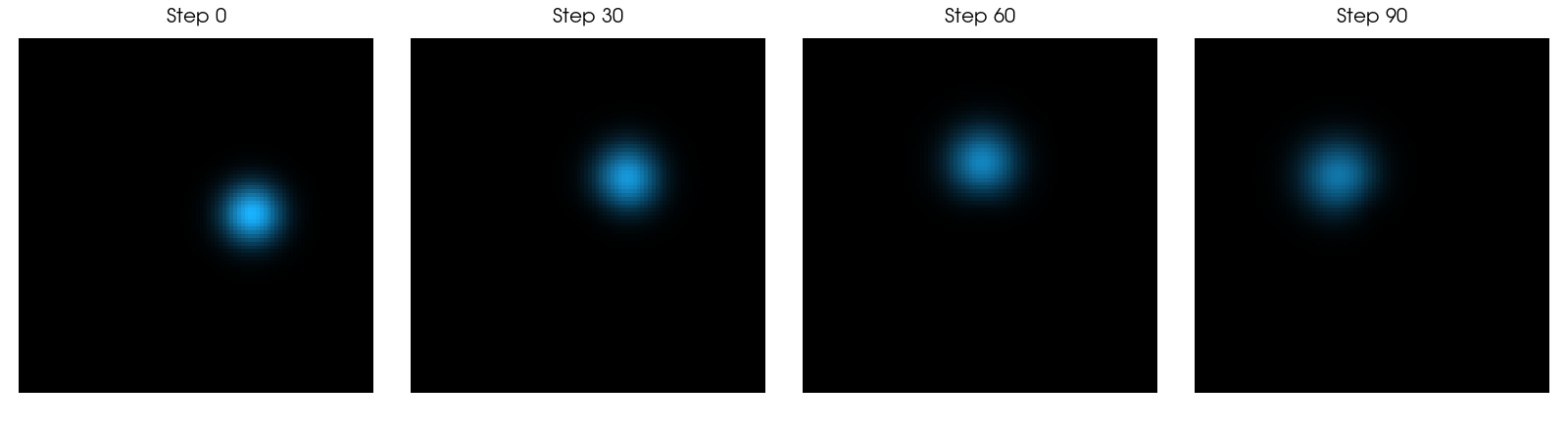
Origin: a teaching adaptation of Taichi's stable-fluid example, Copyright © The Taichi Authors, Apache-2.0. The interpolation/advection pattern is retained; this version uses an analytic rotating velocity, a first-order backtrace and a seeded initial blob. It omits pressure projection, forces and vorticity confinement. It is an advection example, rather than a complete incompressible-fluid solver.
One vector per cell
The dye uses tack.empty((n, n), tack.vec3()). Each element is
an RGB vector. The storage convention is [x, y]; its NumPy form has shape
(n, n, 3). The plotting function transposes the first two axes for an image
library expecting [row, column, RGB].
We use integer coordinates for the sample locations. The rotational velocity
at a point relative to the centre is omega * [-y, x]. Its backward departure
point over a timestep is p - dt * velocity(p).
Interpolate four samples
A departure point usually falls between grid samples. floor finds the lower
corner; the fractional part supplies the weights. The same expression works on
RGB vectors as on scalar values:
@tack.func
def load_clamped(dye, i, j, n):
    return dye[min(max(i, 0), n - 1), min(max(j, 0), n - 1)]


@tack.func
def bilerp(dye, p, n):
    base = int(floor(p))
    f = p - base
    a = load_clamped(dye, base.x, base.y, n)
    b = load_clamped(dye, base.x + 1, base.y, n)
    c = load_clamped(dye, base.x, base.y + 1, n)
    d = load_clamped(dye, base.x + 1, base.y + 1, n)
    return (a * (1.0 - f.x) + b * f.x) * (1.0 - f.y) + (c * (1.0 - f.x) + d * f.x) * f.y
Use floor before int: int(-0.3) truncates to zero, whereas floor(-0.3)
identifies the interval starting at −1. Clamping each load keeps the sampler
within its field. Here clamped coordinates extend the boundary colour outward;
they do not represent a periodic boundary.
One output pixel per iteration
@tack.kernel
def advect(old, new, angular_speed, dt, n):
    for i, j in tack.ndindex(n, n):
        p = tack.vec2(float(i), float(j))
        r = p - (n - 1) * 0.5
        velocity = angular_speed * tack.vec2(-r.y, r.x)
        departure = p - dt * velocity
        new[i, j] = bilerp(old, departure, n)
All four reads come from old, and each iteration writes just new[i, j].
The host swaps the two arrays after the call. Updating dye in place would let
other iterations interpolate partially updated state.
Repeated interpolation smooths the dye. A backward first-order trajectory also introduces integration error. Semi-Lagrangian advection is useful for robust visual simulations, but it is not exactly mass-conserving; avoid treating a plausible image as evidence of a conservative transport method.
Run and experiment
uv run python docs/examples/dye.py --arch cpu --check
uv run --with vtk python docs/examples/dye.py --output dye.png
The check compares several steps with a separate NumPy bilinear implementation and checks finite, bounded colour values. The normal run shows the initial blob and steps 30, 60 and 90.
Try a smaller timestep with proportionally more steps for the same elapsed time. Replace the rotational velocity with a constant translation and compare clamped versus periodic sampling. After that, a reusable velocity-field sampler and a higher-order backtrace are natural extensions.
Complete program
Download dye.py. The adapted code is Apache-2.0 licensed.
# Copyright (c) 2026 Kitware, Inc.
# SPDX-License-Identifier: Apache-2.0
"""Semi-Lagrangian dye advection, adapted from Taichi's stable_fluid.py.

Copyright (c) The Taichi Authors. Apache-2.0; see LICENSE-APACHE-2.0.txt.
Source: https://github.com/taichi-dev/taichi/blob/master/python/taichi/examples/simulation/stable_fluid.py
This teaching version prescribes a velocity instead of solving the fluid equations.
"""

import argparse

import numpy as np

import tack


@tack.func
def load_clamped(dye, i, j, n):
    return dye[min(max(i, 0), n - 1), min(max(j, 0), n - 1)]


@tack.func
def bilerp(dye, p, n):
    base = int(floor(p))
    f = p - base
    a = load_clamped(dye, base.x, base.y, n)
    b = load_clamped(dye, base.x + 1, base.y, n)
    c = load_clamped(dye, base.x, base.y + 1, n)
    d = load_clamped(dye, base.x + 1, base.y + 1, n)
    return (a * (1.0 - f.x) + b * f.x) * (1.0 - f.y) + (c * (1.0 - f.x) + d * f.x) * f.y


@tack.kernel
def advect(old, new, angular_speed, dt, n):
    for i, j in tack.ndindex(n, n):
        p = tack.vec2(float(i), float(j))
        r = p - (n - 1) * 0.5
        velocity = angular_speed * tack.vec2(-r.y, r.x)
        departure = p - dt * velocity
        new[i, j] = bilerp(old, departure, n)


def run(arch="cpu", check=False):
    tack.set_default_device(arch)
    n, steps = (24, 5) if check else (96, 90)
    ii, jj = np.mgrid[:n, :n]
    blob = np.exp(-((ii - 0.65 * n) ** 2 + (jj - 0.5 * n) ** 2) / (0.08 * n) ** 2)
    initial = (blob[..., None] * np.array([0.1, 0.7, 1.0])).astype(np.float32)
    old = tack.empty((n, n), tack.vec3(tack.f32))
    new = tack.empty((n, n), tack.vec3(tack.f32))
    tack.copyto(old, initial)
    reference = initial.copy()
    snapshots = [initial.copy()]
    for step in range(steps):
        advect(old, new, 0.025, 1.0, n)
        old, new = new, old
        if (step + 1) % (steps // 3 if not check else steps) == 0:
            snapshots.append(old.numpy())
        if check:
            # Independent array implementation of the interpolation and backtrace.
            u = ii - 0.025 * (-(jj - (n - 1) * 0.5))
            v = jj - 0.025 * (ii - (n - 1) * 0.5)
            x, y = np.floor(u).astype(int), np.floor(v).astype(int)
            fx, fy = (u - x)[..., None], (v - y)[..., None]
            x0, x1 = np.clip(x, 0, n - 1), np.clip(x + 1, 0, n - 1)
            y0, y1 = np.clip(y, 0, n - 1), np.clip(y + 1, 0, n - 1)
            reference = ((reference[x0, y0] * (1 - fx) + reference[x1, y0] * fx) * (1 - fy)
                         + (reference[x0, y1] * (1 - fx) + reference[x1, y1] * fx) * fy).astype(np.float32)
    result = old.numpy()
    if check:
        np.testing.assert_allclose(result, reference, atol=3e-6, rtol=3e-5)
        assert np.all(np.isfinite(result)) and result.min() >= 0
        assert result.max() <= initial.max() + 1e-6
    return snapshots


def save_figure(snapshots, output):
    import vtkmodules.vtkRenderingFreeType  # register text rendering
    import vtkmodules.vtkRenderingOpenGL2  # noqa: F401  # register the rendering backend
    from vtkmodules.vtkCommonCore import VTK_TEXT_CENTERED, VTK_TEXT_TOP, vtkUnsignedCharArray
    from vtkmodules.vtkCommonDataModel import vtkImageData
    from vtkmodules.vtkIOImage import vtkPNGWriter
    from vtkmodules.vtkRenderingCore import (
        VTK_NORMALIZED_VIEWPORT,
        vtkImageActor,
        vtkRenderer,
        vtkRenderWindow,
        vtkTextActor,
        vtkWindowToImageFilter,
    )


    window = vtkRenderWindow(off_screen_rendering=True, multi_samples=0,
                             size=(400 * len(snapshots), 440))
    for index, (snapshot, label) in enumerate(zip(snapshots, ("Step 0", "Step 30", "Step 60", "Step 90"), strict=True)):
        # Tack stores (x, y, RGB); VTK image tuples are ordered by (y, x).
        data = np.ascontiguousarray(np.rint(np.clip(snapshot.transpose(1, 0, 2), 0, 1) * 255),
                                    dtype=np.uint8)
        image = vtkImageData(dimensions=(data.shape[1], data.shape[0], 1))
        # Attribute data has no settable scalars property: SetScalars makes them active.
        image.point_data.SetScalars(vtkUnsignedCharArray(data.reshape(-1, 3)))
        actor = vtkImageActor(interpolate=False)
        image >> actor.mapper
        renderer = vtkRenderer(background=(1, 1, 1),
                               viewport=(index / len(snapshots), 0, (index + 1) / len(snapshots), 1))
        renderer.AddActor(actor)
        title = vtkTextActor(input=label, position=(0.5, 0.98))
        title.position_coordinate.coordinate_system = VTK_NORMALIZED_VIEWPORT
        text = title.text_property
        text.justification = VTK_TEXT_CENTERED
        text.vertical_justification = VTK_TEXT_TOP
        text.font_size = 20
        text.color = (0, 0, 0)
        renderer.AddViewProp(title)
        camera = renderer.active_camera
        cx, cy = (data.shape[1] - 1) / 2, (data.shape[0] - 1) / 2
        camera.position = (cx, cy, 1)
        camera.focal_point = (cx, cy, 0)
        camera.parallel_projection = True
        camera.parallel_scale = data.shape[0] * 0.6
        window.AddRenderer(renderer)
    window.Render()
    capture = vtkWindowToImageFilter(input=window, read_front_buffer=False)
    writer = vtkPNGWriter(file_name=str(output))
    capture >> writer
    writer.Write()  # calling the writer, or updating it, writes raw pixels instead of a PNG
    window.Finalize()


if __name__ == "__main__":
    parser = argparse.ArgumentParser(description=__doc__)
    parser.add_argument("--arch", default="cpu", choices=["cpu", "metal", "cuda", "hip", "level_zero"])
    parser.add_argument("--check", action="store_true")
    parser.add_argument("--output", help="Save a figure (requires VTK; use without --check)")
    args = parser.parse_args()
    images = run(args.arch, args.check)
    if args.output:
        if args.check:
            parser.error("use --output without --check")
        save_figure(images, args.output)
    print("Dye: check passed" if args.check else "Dye: simulation complete")