Extract parts of a dataset
Most pipelines start by extracting the part of a dataset that matters: an
isosurface, a cut through the volume, the cells in a range or a region, the
outer surface. Tack has the extraction filters VTK has: contour, slice,
clip, threshold, the cell extractors, and the surface and edge filters.
Three of them can seem to answer one question, so the page starts by setting
them side by side. The sections after it give each filter's main options and
show how to choose the fields that come along.
Keep, cut or intersect
The same scalar level can answer three different questions. The example makes
the distance from the centre of a cube, r, and asks all three about the ball
r <= 0.5.
import numpy as np

import tack
import tack.dataset as td

tack.set_default_device("cpu")

data = td.uniform_grid((21, 21, 21), origin=(-1, -1, -1), spacing=(0.1, 0.1, 0.1))
data.fields["r"] = td.Field(td.H1(data), tack.array(np.linalg.norm(data.positions(), axis=1)))

sphere = td.contour(data, "r", 0.5)                # the level set: triangles
ball = td.clip(data, "r", 0.5, inside=True)        # cut cells: the part below 0.5
cells = td.threshold(data, "r", 0.0, 0.5)          # whole cells, every corner in range


def measure(d):
    return td.cell_geometry(d).measure.values.numpy().sum()


print(f"sphere area {measure(sphere):.3f}, ball volume {measure(ball):.3f}, "
      f"whole cells {measure(cells):.3f}")
# sphere area 3.102, ball volume 0.511, whole cells 0.304
assert abs(measure(sphere) - np.pi) < 0.05 * np.pi
assert abs(measure(ball) - 4 / 3 * np.pi * 0.125) < 0.05
assert measure(cells) < measure(ball)
r is an H1 field of order 1, which is point
data: one value per point, linear along each cell's edges. The sphere
approximates the true area π, and the clipped ball the true volume 0.524. The
threshold keeps only the cells that lie wholly inside, so its volume is
smaller. None of the three is wrong: each answers its own question.
-
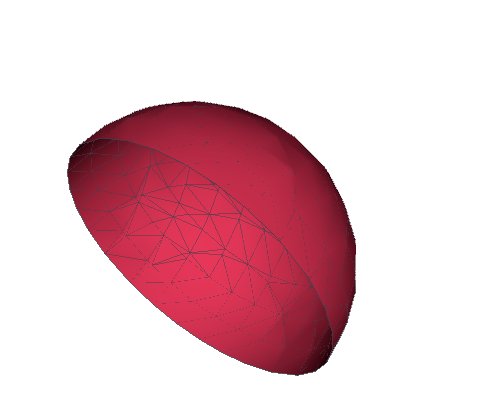
contour: the sphere, a shell of triangles -
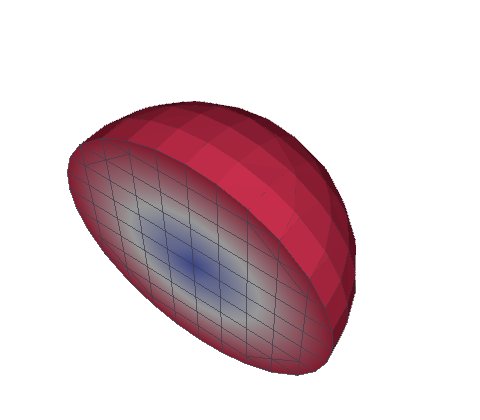
clip: the ball, solid, its cut cells cut to the sphere -
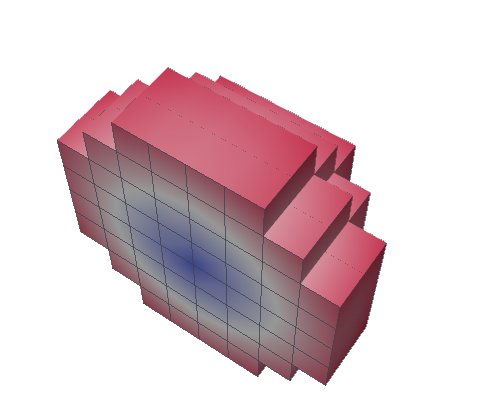
threshold: the whole cells inside, solid and blocky
Each is cut open at the plane y = 0 to show its inside, and colored by r
(the script).
| You want | Filter | Output |
|---|---|---|
| Where a field takes a value | contour |
triangles of a 3D mesh, lines of a 2D one |
| Where an implicit function is zero, a plane say | slice, slice_plane |
the same |
| The part on one side of a level or a surface | clip |
whole cells and pieces of cut cells |
| Cells whose field lies in a range | threshold |
whole cells |
| Cells by id, by region or by box | extract_cells, extract_geometry, extract_extent |
whole cells |
| The outer surface, its edges, its sharp edges | extract_surface, extract_edges, feature_edges |
faces as cells, edges as lines |
Contour a field
contour(data, field, value) is VTK's vtkContourFilter. A 3D mesh gives a
surface of triangles, from VTK's case tables. A 2D mesh gives line cells, and
a mesh of lines gives a vertex at each crossing. Point fields are interpolated
onto the new points, and cell fields go to each triangle from the cell it came
from.
value may be a list. All the levels are then made in one pass over the
cells, and the cell field contour_value says which level each triangle
belongs to:
import numpy as np

import tack
import tack.dataset as td

tack.set_default_device("cpu")

data = td.uniform_grid((21, 21, 21), origin=(-1, -1, -1), spacing=(0.1, 0.1, 0.1))
data.fields["r"] = td.Field(td.H1(data), tack.array(np.linalg.norm(data.positions(), axis=1)))

shells = td.contour(data, "r", [0.3, 0.6, 0.9])
levels = shells.fields["contour_value"].values.numpy()
print(shells.num_cells, "triangles at", np.unique(levels))
assert np.allclose(np.unique(levels), [0.3, 0.6, 0.9])
The main options:
merge_points(on by default) makes neighbouring triangles share their points, so the surface is watertight. A discontinuous field keeps its jumps: anL2field's triangles share points only within each cell.dimension(3, 2 or 1) chooses which cells to contour in a mesh of mixed dimensions. By default it is the mesh's highest. A mesh of tetrahedra and their boundary triangles gives the tetrahedra's surface, or withdimension=2the triangles' lines. Cells of different dimensions are never mixed.fieldschooses the fields to carry (see Choose the fields that come along).
A cell with a NaN among its values makes no surface, so the surface stops at
the cells that hold numbers. A cell field (Constant) has no level set inside
its cells. To contour cell data, first project it to the points.
The full signature is in the
reference.
Slice with a plane or a function
slice_plane(data, origin, normal) cuts the mesh with a plane, as VTK's
vtkCutter does with a vtkPlane. slice(data, function) cuts it where an
implicit function is zero. Both are contours of a function of position, so
they carry fields as contour does and take its merge_points and fields.
value sets the level, and a list of values gives parallel planes, or nested
surfaces, in one pass.
import numpy as np

import tack
import tack.dataset as td

tack.set_default_device("cpu")

data = td.uniform_grid((21, 21, 21), origin=(-1, -1, -1), spacing=(0.1, 0.1, 0.1))
data.fields["r"] = td.Field(td.H1(data), tack.array(np.linalg.norm(data.positions(), axis=1)))

section = td.slice_plane(data, origin=(0, 0, 0.05), normal=(0, 0, 1))
stack = td.slice_plane(data, origin=(0, 0, 0.05), normal=(0, 0, 1), value=[-0.5, 0.0, 0.5])
shell = td.slice(data, td.Sphere(center=(0, 0, 0), radius=0.5))

area = td.cell_geometry(section).measure.values.numpy().sum()
print(f"section area {area:.3f}, carrying {list(section.fields)}")
assert np.isclose(area, 4.0) and "r" in section.fields
assert np.allclose(np.unique(stack.positions()[:, 2]), [-0.45, 0.05, 0.55], atol=1e-6)
For slice_plane, value is a signed distance along the unit normal. The
implicit functions are VTK's:
| Tack | VTK | Negative |
|---|---|---|
td.Plane(origin, normal) |
vtkPlane |
behind the plane |
td.Sphere(center, radius) |
vtkSphere |
inside |
td.Cylinder(center, axis, radius) |
vtkCylinder |
inside |
td.Box(lower, upper) |
vtkBox |
inside |
td.Planes(origins, normals) |
vtkPlanes |
inside all the planes |
td.Union, td.Intersection, td.Difference |
vtkImplicitBoolean |
inside the combination |
Each function is negative inside its region, zero on its boundary and
positive outside, as in VTK. td.Difference(box, sphere) is the box with a
ball taken out. The functions run on the device, as part of the filter's
kernels. See the reference for
slice
and slice_plane.
Clip by a field or a function
clip(data, by, value) keeps the part of the mesh where by is at or above
value. by is a point field (or its name) or an implicit function, for which
value is 0. With inside=True it keeps the part below instead. It works as
VTK's vtkTableBasedClipDataSet does: cells wholly kept keep their shape, and
cut cells become the pieces their case table lists. Point fields are
interpolated onto the new points, and cell fields go to every piece of their
cell.
import numpy as np

import tack
import tack.dataset as td

tack.set_default_device("cpu")

data = td.uniform_grid((11, 11, 11), origin=(-1, -1, -1), spacing=(0.2, 0.2, 0.2))
data.fields["x"] = td.Field(td.H1(data), tack.array(data.positions()[:, 0].copy()))

half = td.clip(data, td.Plane(origin=(0.1, 0, 0), normal=(1, 0, 0)))   # keeps x >= 0.1
other = td.clip(data, "x", 0.1, inside=True)                          # keeps x <= 0.1
outside = td.clip(data, td.Sphere(center=(0, 0, 0), radius=0.5))      # keeps r >= 0.5

volume = [td.cell_geometry(d).measure.values.numpy().sum() for d in (half, other)]
print(f"volumes {volume[0]:.3f} + {volume[1]:.3f}")
assert np.isclose(volume[0], 0.9 * 4) and np.isclose(volume[1], 1.1 * 4)
The default side is the positive one, so clip(data, plane) keeps the side
the normal points to, and clip(data, sphere) keeps the outside. Pass
inside=True to keep the inside of a function's region. extract_geometry,
below, is the other way round: it keeps the inside by default.
A polyhedral mesh is clipped into polyhedra: each cut cell becomes the polyhedron of its kept part, capped by its iso-polygons. Polygon and polyline meshes are not clipped yet. The full signature is in the reference.
Keep cells whose field lies in a range
threshold(data, field, lower, upper) keeps the cells whose field lies in
[lower, upper], with only the points they use, as VTK's vtkThreshold does.
The cells keep their shapes and their order, and their points are renumbered
in order.
- For a cell field (
Constant), the cell's one value decides. - For a point field, every corner must be in range by default. With
all_points=False, one corner in range is enough (VTK'sAllScalarsoff).
import numpy as np

import tack
import tack.dataset as td

tack.set_default_device("cpu")

data = td.uniform_grid((21, 21, 21), origin=(-1, -1, -1), spacing=(0.1, 0.1, 0.1))
data.fields["r"] = td.Field(td.H1(data), tack.array(np.linalg.norm(data.positions(), axis=1)))

inside = td.threshold(data, "r", 0.0, 0.5)                       # every corner in range
touching = td.threshold(data, "r", 0.0, 0.5, all_points=False)   # any corner in range
print(inside.num_cells, "cells inside,", touching.num_cells, "touching")
# 304 cells inside, 792 touching
assert inside.num_cells < touching.num_cells
assert inside.positions().shape[0] == inside.num_points           # only the points used
The output is an unstructured mesh, even when the input is an image. See the reference.
Extract cells by id, by region or by box
Three filters keep whole cells chosen another way. Each keeps only the points
the cells use, and carries the fields as threshold does.
extract_cells(data, cells)keeps cells by id, as VTK'svtkExtractCells.cellsis an array of ids, an integer field, a cell set, or the name of a set indata.sets. The cells keep their order in the mesh, not the order given.extract_geometry(data, function)keeps the cells inside an implicit function, as VTK'svtkExtractGeometry: cells with every point at or below zero. Withinside=Falseit keeps the cells outside, and withboundary=Trueit also keeps the cells the function's surface cuts.extract_extent(data, extent, rate=1)keeps a box of a structured grid, as VTK'svtkExtractGridandvtkExtractVOI.extentis a (low, high) pair of point indices per axis, both included, or VTK's flat(i0, i1, j0, j1, k0, k1).ratekeeps every n-th point. The output is a grid of the same kind, so an image stays an image. A box one point thick is a grid of one dimension less.
import numpy as np

import tack
import tack.dataset as td

tack.set_default_device("cpu")

data = td.uniform_grid((21, 21, 21), origin=(-1, -1, -1), spacing=(0.1, 0.1, 0.1))

picked = td.extract_cells(data, np.array([0, 1, 2, 7999]))
ball = td.extract_geometry(data, td.Sphere(center=(0, 0, 0), radius=0.5))
cut = td.extract_geometry(data, td.Sphere(center=(0, 0, 0), radius=0.5), boundary=True)
corner = td.extract_extent(data, ((0, 10), (0, 10), (0, 10)))
coarse = td.extract_extent(data, ((0, 20), (0, 20), (0, 20)), rate=2)
layer = td.extract_extent(data, ((0, 20), (0, 20), (10, 10)))      # a plane: 2D

print(picked.num_cells, ball.num_cells, cut.num_cells, corner.num_cells, layer.num_cells)
assert (picked.num_cells, picked.num_points) == (4, 24)
assert ball.num_cells < cut.num_cells
assert isinstance(corner.topology, td.StructuredTopology) and corner.num_cells == 1000
assert coarse.num_points == 11 ** 3 and layer.num_cells == 400
The reference has extract_cells,
extract_geometry
and extract_extent.
Extract the surface and its edges
extract_surface(data) is the outer surface of a mesh, as VTK's
vtkDataSetSurfaceFilter. A 3D mesh's boundary faces become triangles, quads
or polygons, wound outward. A 2D mesh is its own surface and passes through.
The surface's points are the ones its faces use, renumbered in order, as VTK's
geometry filter keeps them. Point fields come along at those points, and each
face takes its cell's cell fields.
boundary_faces(data) gives the same boundary as a face set instead of a
dataset. extract_surface(data, faces) makes a surface of any face set, or of
the name of one in data.sets.
extract_edges(data) makes every edge a line cell on the same points, as VTK's
vtkExtractEdges. feature_edges(surface) keeps the edges of a surface by
how many cells meet there and at what angle, as VTK's vtkFeatureEdges:
- boundary edges belong to one cell.
- feature edges belong to two cells whose normals are at least
angledegrees apart, 30 by default. - non-manifold edges belong to three or more cells.
- manifold edges are the other edges of two cells. They are off by default.
The output's cell field kind says which kind each edge is (td.EdgeKind).
feature_edges works on 2D cells, so a volume mesh's surface comes from
extract_surface first.
import tack
import tack.dataset as td

tack.set_default_device("cpu")

box = td.uniform_grid((4, 3, 3))                      # 3 x 2 x 2 cells
surface = td.extract_surface(box)
edges = td.extract_edges(surface)
sharp = td.feature_edges(surface)                     # the box's 12 edges, in segments
kinds = sharp.fields["kind"].values.numpy()

print(surface.num_cells, "faces,", edges.num_cells, "edges,", sharp.num_cells, "feature edges")
assert surface.num_cells == len(td.boundary_faces(box)) == 2 * (6 + 6 + 4)
assert sharp.num_cells == 4 * 3 + 4 * 2 + 4 * 2 and (kinds == td.EdgeKind.FEATURE).all()
assert td.feature_edges(td.uniform_grid((4, 4))).num_cells == 12    # an open square's boundary
surface_normals(surface) adds normals to a surface, as VTK's
vtkPolyDataNormals without splitting: a unit normal per cell as
cell_normals, and one at each point as normals, the sum of its cells'
normals made unit length. It first winds every connected region's polygons
alike, as VTK's consistency option does. With weights="area", small slivers
count for little in the points' normals.
The reference has
extract_surface,
extract_edges,
feature_edges
and surface_normals.
Choose the fields that come along
Every filter on this page takes fields=. By default it carries every field
it can. A name or a list of names selects fields, and [] keeps the geometry
alone. An unknown name raises KeyError. A field you computed travels only if
it is in data.fields.
import numpy as np

import tack
import tack.dataset as td

tack.set_default_device("cpu")

data = td.uniform_grid((21, 21, 21), origin=(-1, -1, -1), spacing=(0.1, 0.1, 0.1))
data.fields["r"] = td.Field(td.H1(data), tack.array(np.linalg.norm(data.positions(), axis=1)))
data.fields["source_cell"] = td.cell_ids(data)       # a cell field: each cell's id

sphere = td.contour(data, "r", 0.5, fields=["source_cell"])
bare = td.contour(data, "r", 0.5, fields=[])
print(list(sphere.fields), list(bare.fields))
assert list(sphere.fields) == ["source_cell"] and list(bare.fields) == []
How a field travels depends on where its values live:
| Field | On the output |
|---|---|
point data (H1) |
kept at kept points, and interpolated along the edge at new points |
cell data (Constant) |
copied to each kept cell, or each piece or triangle of a cut cell |
L2 |
kept cell by cell where whole cells survive |
| values on faces or edges | kept where the filter keeps the faces, as extract_surface does, and otherwise left behind |
Integer point fields are not interpolated: contour, slice and clip,
which make new points, leave them behind, while threshold and the other
filters that keep whole cells carry them. To keep labels through a cut, store
them on the cells. td.cell_ids(data), as above, records which input
cell each output cell came from, since the output's own cells are numbered
afresh. Cell sets come through filters the same way: an output cell is in a
set when the cell it came from was, and the set refers to the output's own
cells.
Cut higher-order fields and curved cells
A field above order 1, or a curved geometry, has level sets that bend inside
each cell. contour, slice and slice_plane cut such a dataset on linear
sub-cells of the cells the level can reach. By default each cell is cut into
as many steps along each axis as the field's or the geometry's order,
whichever is larger. Each new point is placed where the field itself takes the
value, so the surface's points lie on the true level set whatever the number
of steps. The steps decide only how finely the surface is faceted.
import numpy as np

import tack
import tack.dataset as td

tack.set_default_device("cpu")


@tack.func
def blob(x):
    return x.x * x.x * x.x - x.y * x.z + 0.5 * x.y * x.y


data = td.uniform_grid((5, 5, 5), spacing=(0.25, 0.25, 0.25))
data.fields["u"] = td.interpolate(data, blob, td.H1(data, order=3))

surface = td.contour(data, "u", 0.2)                   # 3 steps a cell, the field's order
p = surface.positions().astype(np.float64)
error = np.abs(p[:, 0] ** 3 - p[:, 1] * p[:, 2] + 0.5 * p[:, 1] ** 2 - 0.2).max()

whole, part = td.clip(data, "u", 0.2).partitions       # a PartitionedDataSet
print(surface.num_cells, "triangles, off the level set by", f"{error:.1e}")
print(whole.num_cells, "whole cells of order", whole.fields["u"].space.order,
      "and", part.num_cells, "linear pieces")
assert error < 1e-5 and whole.fields["u"].space.order == 3
-
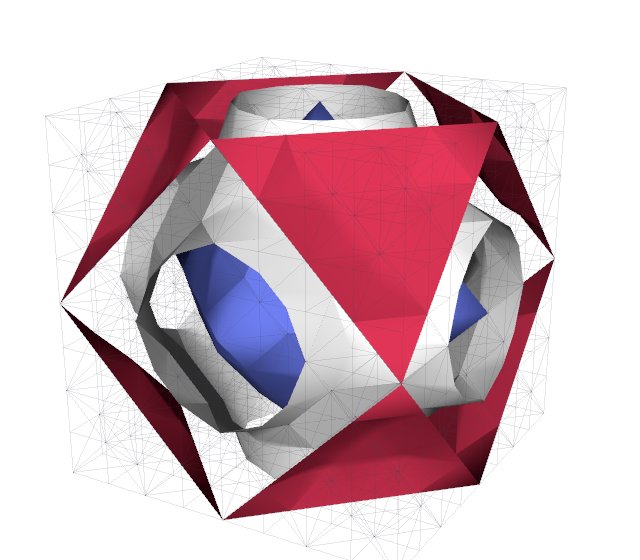
Linear tetrahedra: each cut is flat within its cell
-
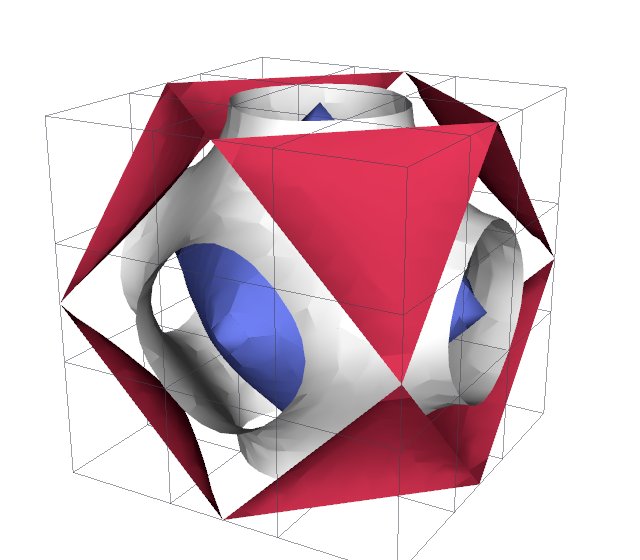
An order-4 field on straight hexahedra: the cuts bend inside the cells
-
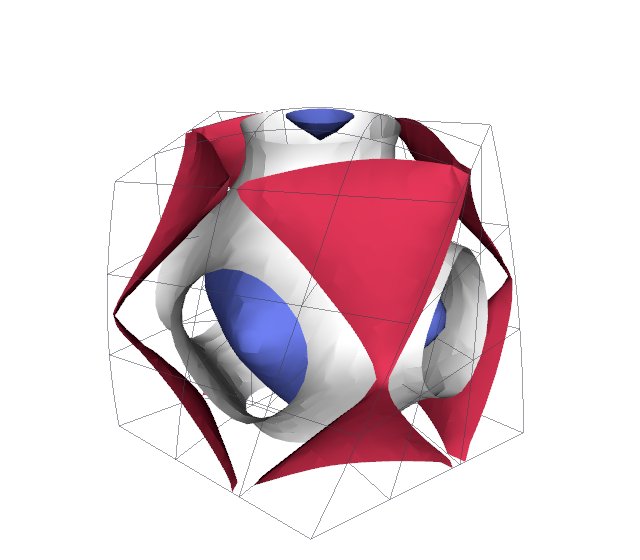
Curved cells of order 3, the field of order 3 on them
The same field contoured on three kinds of cells. Where the field or the geometry is of higher order, the surface follows the level set inside each cell, not a straight line between the corners (gallery).
The options:
subdivision=ncuts each cell intonsteps along each axis.tolerance=chooses the fewest steps whose estimated error is within it, in the field's unit. Givesubdivisionortolerance, not both.exact=Falseplaces each point where the straight line between the sub-cells' values crosses the level, as a linear contour of the sub-cells would.
clip and threshold keep what they need not cut. Cells that lie wholly on
the kept side stay as they are, curved and of their order. Only the others are
cut into linear sub-cells. The result is a PartitionedDataSet of the two
parts, whole cells first, and their shared points are owned once, so
summaries over both parts count each point once. A dataset of straight cells
and order-1 fields clips and thresholds into one dataset, as above.
slice and slice_plane cut a function of position, so only a curved
geometry makes them subdivide. They follow it on segments, quads, hexahedra
and voxels, and use the corners of other curved cells. The
higher-order page explains the fields themselves.
Details
Empty outputs are valid. A filter that finds nothing returns a dataset of
no cells. Check num_cells before assuming there is geometry to draw.
Clips through mesh points. clip names its new points by the edges they
lie on, as VTK's vtkTableBasedClipDataSet does. A clip exactly through mesh
points, such as a plane through a layer of faces, therefore leaves a new point
on top of the mesh point and cells of no volume between them, as VTK's does.
td.merge_points merges the coincident points, as VTK's vtkCleanGrid does.
contour and slice instead make such a crossing the mesh point itself, and
drop the triangles that lose their area.
Cells without a reference element. Polyhedra, polygons and polylines have no parametric cell, so the filters treat them as the polyhedra page explains: a field is linear on the tetrahedra and triangles each cell is fanned into.
| Filter | Shapes | Polyhedra and polygons | Polylines |
|---|---|---|---|
threshold, extract_cells, extract_geometry |
yes | yes | yes |
contour, slice |
yes, and above order 1 on segments, quads, hexahedra, triangles, tetrahedra and wedges | yes | contour gives vertices |
clip |
yes | polyhedra, into polyhedra, but not polygons yet | not yet |
extract_surface |
yes | yes | the chains' ends |
An order-2 H1 field on pyramids is refused by the cuts. Pyramids support
order 1.
Where to go next
- Derive quantities: gradients, cell measures and quality, integrals, and moving fields between point and cell data.
- Filters over pieces: every filter here on a dataset in pieces, each piece computing its share of the whole's output.
- Write a filter, when none of these does what you need.