Dataset Info
The Dataset Info panel shows read-only frame metadata, properties of the whole dataset, and custom metadata attached to it. It is one pane of the context sidebar.
Metadata you add travels with the dataset: it is shown while annotating and written into DIVE Configuration, VIAME CSV, and COCO / KWCOCO exports, so downstream tooling can re-link annotations to their source records.
What it shows
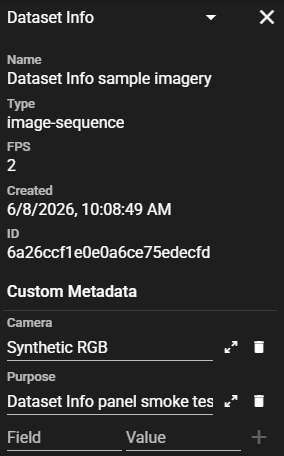
The pane holds three collapsible sections:
Frame Metadata (read-only): per-frame metadata for the active frame, such as timestamp, latitude, longitude, depth, or altitude. It shows only the source fields for that frame, in the order they appear in the source file.
Dataset Info (read-only): Name, Type, FPS, Original FPS and Subtype (when set), Created date, and ID (the Girder folder id).
Custom Dataset Info — a free-form list of key/value pairs stored on the dataset, for example a station id, cruise number, or dive number.
Frame Metadata
The Frame Metadata section shows values for the active frame, updating as the playhead moves and following the active camera on multicamera datasets. The section header carries an information icon when an attachment supplied the values; hover it to see which file they came from. When there are no values to show, the section says why in place of the rows.
See Frame Metadata Sidecars for supported filenames, file format, placement, and limits.
Where the data is stored
Custom metadata lives on the dataset's folder metadata under the datasetInfo key — the
same key the exporter reads. Because it is ordinary Girder metadata, you can populate it
three ways:
- By hand in the panel — good for one-offs and corrections.
- At upload, from a pipeline — stamp it when the dataset is created:
(equivalently
1
2
3
gc.addMetadataToFolder(folder_id, { "datasetInfo": {"gfishsite_id": "2024TXN012", "cruise": "2403", "year": "2024"}, })PUT /folder/{folder_id}/metadata). This is the intended end state for batch ingest: stamp identifiers once and they flow through to export. Seesamples/scripts/uploadScript.py. - After the fact, with a script — the same call works on existing datasets.
How it is exported
Non-empty datasetInfo is included in dataset-level exports with format-specific keys:
- DIVE Configuration JSON: top-level
datasetInfo. - VIAME CSV:
dataset_infoin the# metadataheader. - COCO / KWCOCO:
info.dive_dataset_info.
Imports restore datasetInfo using the selected import mode. See
Data Formats for the exact wire format and merge behavior.
Value types
The panel stores values as text. A script may write typed values (numbers, objects);
they serialize into the export as-is. Keep datasetInfo a flat key/value object.